
——
#DonLucElectronics #DonLuc #Time #DS3231PrecisionRTC #SHARPMemoryDisplay #GPSReceiver #Arduino #ESP32 #SparkFunThingPlusESP32WROOM #Project #Programming #Electronics #Microcontrollers #Consultant #VideoBlog
——
——
——
——
——
——
GPS Receiver – GP-20U7
The GP-20U7 is a compact GPS receiver with a built-in high performances all-in-one GPS chipset. The GP-20U7 accurately provides position, velocity, and time readings as well possessing high sensitivity and tracking capabilities. Thanks to the low power consumption this receiver requires, the GP-20U7 is ideal for portable applications such as tablet PCs, smart phones, and other devices requiring positioning capability.
This 56-channel GPS module, that supports a standard NMEA-0183 and uBlox 7 protocol, has low power consumption of 40mA@3.3V (max), an antenna on board, and -162dBm tracking sensitivity. With 56 channels in search mode and 22 channels “all-in-view” tracking, the GP-20U7 is quite the work horse for its size.
This one is unused and doesnt have a conection TX pin.
NMEA V3.01 Protocol
- Its output signal level is TTL: 9600bps (default), 8 bit data, 1 stop bit and no parity
- It supports the following NMEA-0183
- Messages: GGA, GLL, GSA, GSV, RMC and VTG
NMEA-0183 Output Messages
- NMEA: Record Description
- GGA: Global positoning system fixed data
- GLL: Geogrphic position – latitude / longitude
- GSA: GNSS DOP and active satellites
- GSV: GNSS satellites in view
- RMC: Recommended minimum specific GNSS data
- VTG: Course over ground and ground speed
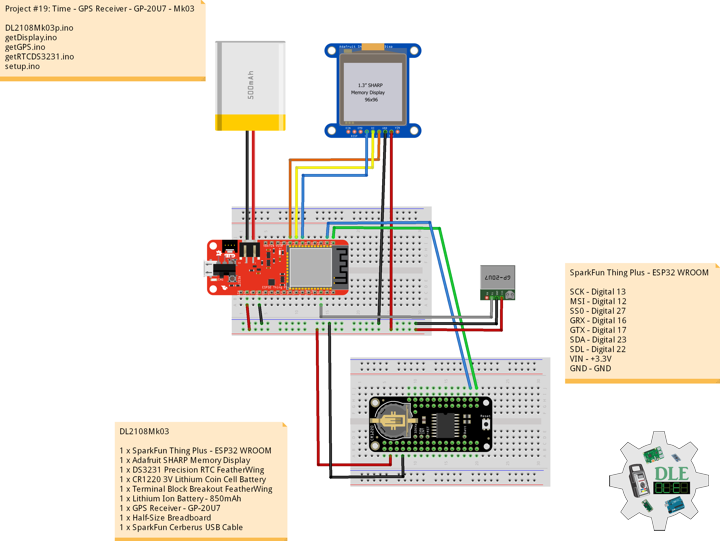
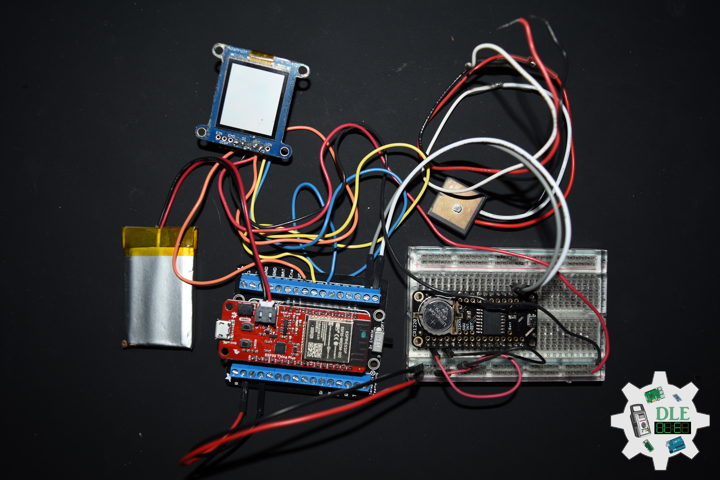
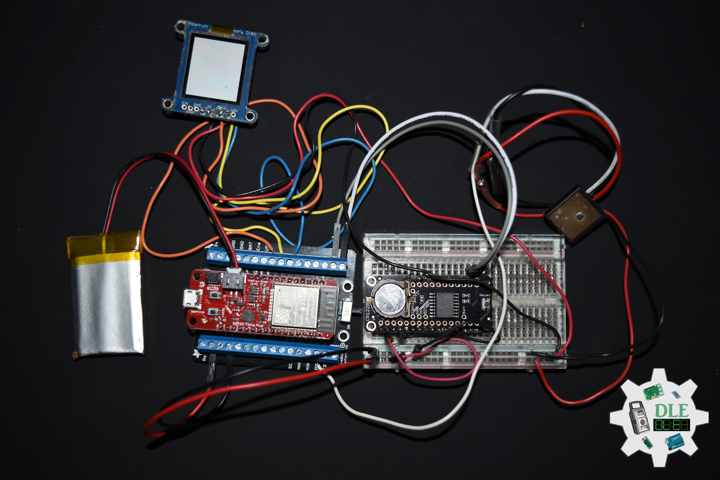
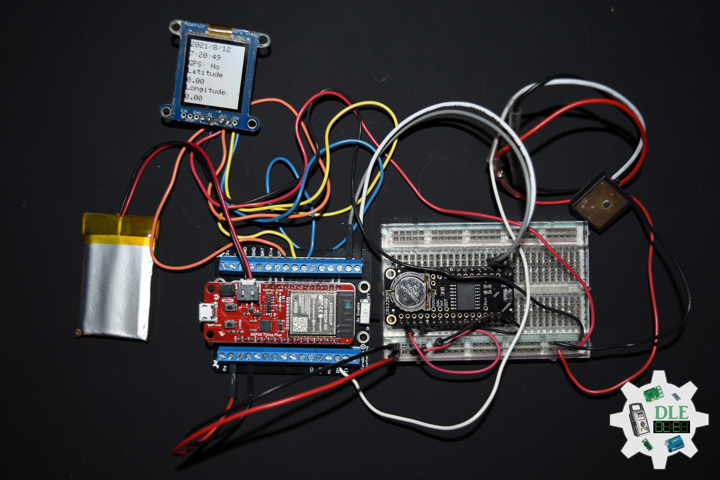
DL2108Mk03
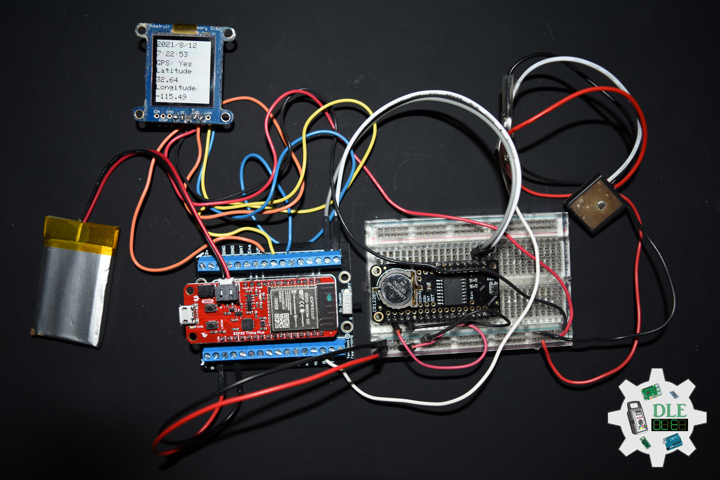
1 x SparkFun Thing Plus – ESP32 WROOM
1 x Adafruit SHARP Memory Display
1 x DS3231 Precision RTC FeatherWing
1 x CR1220 3V Lithium Coin Cell Battery
1 x Terminal Block Breakout FeatherWing
1 x Lithium Ion Battery – 850mAh
1 x GPS Receiver – GP-20U7
1 x Half-Size Breadboard
1 x SparkFun Cerberus USB Cable
SparkFun Thing Plus – ESP32 WROOM
SCK – Digital 13
MSI – Digital 12
SS0 – Digital 27
GRX – Digital 16
GTX – Digital 17
SDA – Digital 23
SDL – Digital 22
VIN – +3.3V
GND – GND
DL2108Mk03p.ino
/*
***** Don Luc Electronics © *****
Software Version Information
Project #19: Time -GPS Receiver - GP-20U7 - Mk03
08-03
DL2108Mk03p.ino
1 x SparkFun Thing Plus - ESP32 WROOM
1 x Adafruit SHARP Memory Display
1 x DS3231 Precision RTC FeatherWing
1 x CR1220 3V Lithium Coin Cell Battery
1 x Terminal Block Breakout FeatherWing
1 x Lithium Ion Battery - 850mAh
1 x GPS Receiver - GP-20U7
1 x Half-Size Breadboard
1 x SparkFun Cerberus USB Cable
*/

// Include the Library Code
// Wire
// #include <Wire.h>
// SHARP Memory Display
#include <Adafruit_SharpMem.h>
#include <Adafruit_GFX.h>
// Date and time DS3231 RTC
#include <RTClib.h>
// GPS Receiver
#include <TinyGPS++.h>
// ESP32 Hardware Serial
#include <HardwareSerial.h>

// SHARP Memory Display
#define SHARP_SCK  13
#define SHARP_MOSI 12
#define SHARP_SS   27
// Set the size of the display here, e.g. 144x168!
Adafruit_SharpMem display(SHARP_SCK, SHARP_MOSI, SHARP_SS, 144, 168);
// The currently-available SHARP Memory Display (144x168 pixels)
// requires > 4K of microcontroller RAM; it WILL NOT WORK on Arduino Uno
// or other <4K "classic" devices.
#define BLACK 0
#define WHITE 1

// Date and time functions using a DS3231 RTC
RTC_DS3231 RTC;
String sDate;
String sTime;

// ESP32 HardwareSerial
HardwareSerial tGPS(2);

// GPS Receiver
#define gpsRXPIN 16
// This one is unused and doesnt have a conection
#define gpsTXPIN 17
// The TinyGPS++ object
TinyGPSPlus gps;
float TargetLat;
float TargetLon;
int GPSStatus = 0;
String GPSSt = "";

// Software Version Information
// Version
String sver = "19-03";

void loop()
{

  // Dates and Time
  timeRTC();

  // isGPS
  isGPS();

  // Display Date, Time, GPS
  isDisplayDate();

  delay( 1000 );

}
getDisplay.ino
// SHARP Memory Display
// SHARP Memory Display - UID
void isDisplayUID() {

    // Text Display
    // Clear Display
    display.clearDisplay();
    display.setRotation(4);
    display.setTextSize(3);
    display.setTextColor(BLACK);
    // Don Luc Electronics
    display.setCursor(0,10);
    display.println( "Don Luc" );
    display.setTextSize(2);
    display.setCursor(0,40);
    display.println( "Electronics" );
    // Version
    display.setTextSize(3);
    display.setCursor(0,70);
    display.println( "Version" );
    display.setTextSize(2);
    display.setCursor(0,100);
    display.println( sver );
    // Refresh
    display.refresh();
    delay( 100 );

}
// Display Date
void isDisplayDate() {

    // Text Display Date
    // Clear Display
    display.clearDisplay();
    display.setRotation(4);
    display.setTextSize(2);
    display.setTextColor(BLACK);
    // Date
    display.setCursor(0,5);
    display.println( sDate );
    // Time
    display.setCursor(0,30);
    display.println( sTime );
    // GPS Status
    display.setCursor(0,55);
    display.print( "GPS: " );
    display.println( GPSSt );
    // Target Latitude
    display.setCursor(0,75);
    display.println( "Latitude" );
    display.setCursor(0,100);
    display.println( TargetLat );
    // Target Longitude
    display.setCursor(0,120);
    display.println( "Longitude" );
    display.setCursor(0,145);
    display.println( TargetLon );
    // Refresh
    display.refresh();
    delay( 100 );

}
getGPS.ino
// GPS Receiver
// Setup GPS
void setupGPS() {

  // Setup GPS
  tGPS.begin(  9600 , SERIAL_8N1 , gpsRXPIN , gpsTXPIN );

}
// isGPS
void isGPS(){

  // Receives NEMA data from GPS receiver
  // This sketch displays information every time a new sentence is correctly encoded
  while ( tGPS.available() > 0)

    if (gps.encode( tGPS.read() ))
    {

       // GPS Vector Pointer Target
       displayInfo();

    }

  if (millis() > 5000 && gps.charsProcessed() < 10)
  {

     while(true);

  }

}
// GPS Vector Pointer Target
void displayInfo(){

  // Location
  if (gps.location.isValid())
  {

     // Latitude
     TargetLat = gps.location.lat();
     // Longitude
     TargetLon = gps.location.lng();
     // GPS Status 2
     GPSStatus = 2;
     GPSSt = "Yes";

  }
  else
  {

     // GPS Status 0
     GPSStatus = 0;
     GPSSt = "No";

  }

}
getRTCDS3231.ino
// DS3231 Precision RTC
// Setup RTC
void setupRTC() {

  // DS3231 Precision RTC
  RTC.begin();
  if (! RTC.begin()) {
    while (1);
  }

  // Date Time
  DateTime now = RTC.now();

  if (RTC.lostPower()) {

    // Following line sets the RTC to the date & time this sketch was compiled
    RTC.adjust(DateTime(F(__DATE__), F(__TIME__)));
    // This line sets the RTC with an explicit date & time, for example to set
    // August 2, 2021 at 13:53:0 you would call:
    // RTC.adjust(DateTime(2021, 8, 2, 14, 11, 0));

  }

}
// timeRTC
void timeRTC() {

    // DS3231 Precision RTC
    sDate = "";
    sTime = "";
    // Date Time
    DateTime now = RTC.now();

    // sData
    sDate += String(now.year(), DEC);
    sDate += "/";
    sDate += String(now.month(), DEC);
    sDate += "/";
    sDate += String(now.day(), DEC);

    // sTime
    sTime += String(now.hour(), DEC);
    sTime += ":";
    sTime += String(now.minute(), DEC);
    sTime += ":";
    sTime += String(now.second(), DEC);

}
setup.ino
// Setup
void setup()
{

  // GPS Receiver
  // Setup GPS
  setupGPS();

  // Set up I2C bus
  // Wire.begin();

  // SHARP Display Start & Clear the Display
  display.begin();
  // Clear Display
  display.clearDisplay();

  // Display UID
  isDisplayUID();

  // Setup RTC
  setupRTC();

  delay( 5000 );

}
——
People can contact us: https://www.donluc.com/?page_id=1927
Technology Experience
- Single-Board Microcontrollers (PIC, Arduino, Raspberry Pi,Espressif, etc…)
- IoT
- Robotics
- Research & Development (R & D)
- Desktop Applications (Windows, OSX, Linux, Multi-OS, Multi-Tier, etc…)
- Mobile Applications (Android, iOS, Blackberry, Windows Mobile, Windows CE, etc…)
- Web Applications (LAMP, Scripting, Java, ASP, ASP.NET, RoR, Wakanda, etc…)
- Social Media Programming & Integration (Facebook, Twitter, YouTube, Pinterest, etc…)
- Content Management Systems (WordPress, Drupal, Joomla, Moodle, etc…)
- Bulletin Boards (phpBB, SMF, Vanilla, jobberBase, etc…)
- eCommerce (WooCommerce, OSCommerce, ZenCart, PayPal Shopping Cart, etc…)
Instructor
- PIC Microcontrollers
- Arduino
- Raspberry Pi
- Espressif
- Robotics
- DOS, Windows, OSX, Linux, iOS, Android, Multi-OS
- Linux-Apache-PHP-MySQL
Follow Us
J. Luc Paquin – Curriculum Vitae – 2021 English & Español
https://www.jlpconsultants.com/CV/LucPaquinCVEngMk2021c.pdf
https://www.jlpconsultants.com/CV/LucPaquinCVEspMk2021c.pdf
Web: https://www.donluc.com/
Web: https://www.jlpconsultants.com/
Web: https://www.donluc.com/DLE/
Web: https://www.donluc.com/DLHackster/
Web: https://www.hackster.io/neosteam-labs
Web: https://zoom.us/
Patreon: https://www.patreon.com/DonLucElectronics
Facebook: https://www.facebook.com/neosteam.labs.9/
YouTube: https://www.youtube.com/channel/UC5eRjrGn1CqkkGfZy0jxEdA
Twitter: https://twitter.com/labs_steam
Pinterest: https://www.pinterest.com/NeoSteamLabs/
Instagram: https://www.instagram.com/neosteamlabs/
Don Luc